
 Back-to-school gets easier when you stop chasing fires and start running systems. The goal isn’t more control—it’s more confidence: predictable routines for kids, visible safety for parents, and communication that respects learning time. With a LAGENIO kids’ smartwatch, you can set these up in minutes.
1) The Morning Micro-Habit System
What to do: Create three light, repeatable cues—Wake, Pack, Out the Door.
Why it works: Kids tap reminders themselves and start the day with a win; you do less herding.
How to set it: Add three alarms and a simple backpack checklist (lunch, water, homework). Keep each alert short and positive.
2) The “I Can See It” Safety System
What to do: Turn on real-time location and set geofences for Home, School, and one activity.
Why it works: You don’t need a string of “Where are you?” messages—departure and arrival alerts keep everyone aligned.
In case of detours: If an alert doesn’t trigger, check live location first; call only if needed.
3) The Focus-First System (Class & Quiet Hours)
What to do: Schedule Class Mode for school hours and add a short quiet window for homework.
Why it works: The watch becomes a partner in attention—not another interruption.
Good to know: SOS and location always stay available, even when notifications are muted.
4) The Low-Friction Connection System
What to do: Use 4G calling for quick coordination before/after class, and send a 10-second lunch voice note.
Why it works: You stay emotionally close without turning the day into a back-and-forth chat during learning time.
Tip: Batch non-urgent messages for natural breaks so kids can stay present in class or at practice.
5) The Curiosity Window (K9 Only)
What to do: Give questions a lane with Nio AI on the K9: simple “one question, one minute” guardrails for science why’s and writing prompts.
Why it works: Kids feel heard and guided; learning becomes bite-sized and pressure-free.
Parent guardrails: Keep topics age-friendly and time-boxed; celebrate good questions more than “right” answers.
Ten-Minute Setup (Copy & Apply)
- Alarms ×3: Wake / Pack / After-school
- Geofences ×2–3: Home / School / Activity
- Class Mode: Mon–Fri during school hours
- Quiet window: Daily homework slot
- Message templates ×2: “Leaving now” / “Arrived—see you soon”
- Emergency contacts ×2: Parents + a nearby adult
- K9 only: Nio AI rules (“one q, one min”)
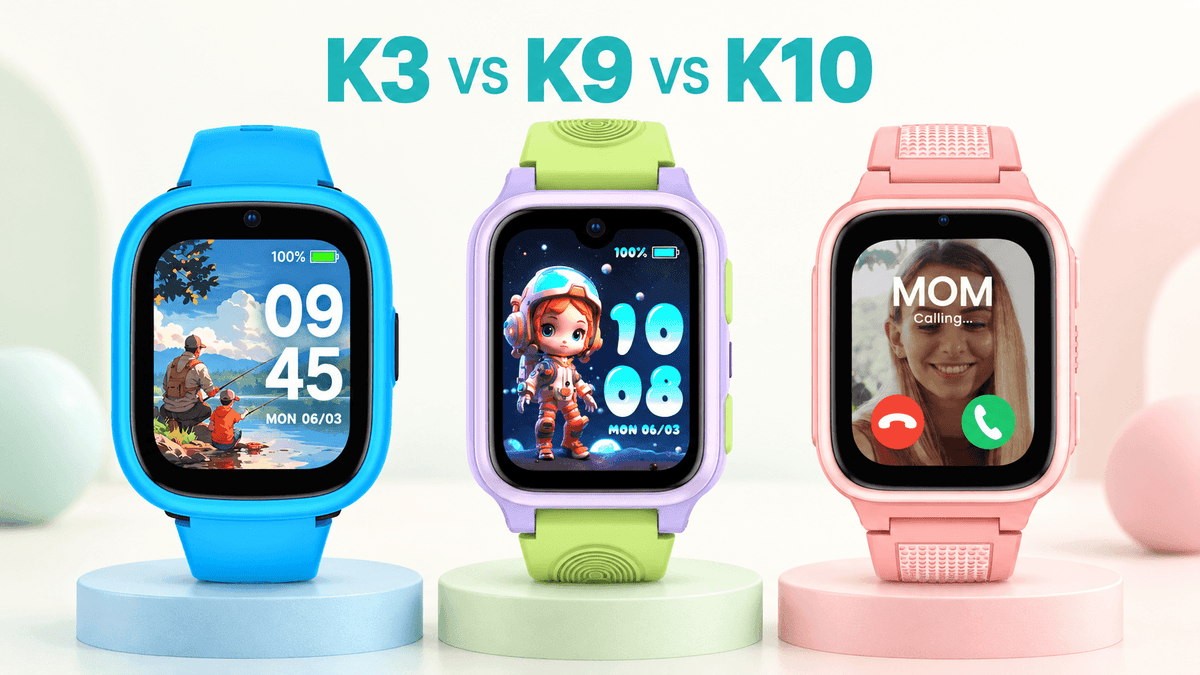
- Style boost: K3 swappable shells so kids want to wear it
- Everyday durability: IP68 for rain/splashes/hand-washing (not for swimming)
Mini Scripts Parents Love (and Kids Don’t Mind)
- Before class: “Ping me once you arrive; I’ll see the alert too.”
- After class: “Heading to practice? Send the ‘Leaving now’ note.”
- Homework start: “Quiet time starts now—text me after the first 20.”
- Safety drill (monthly): “Show me SOS, then cancel—just a practice.”
Which Model Fits?
Choose K9 if you want learning support via Nio AI and more guidance moments.
Choose K3 if personalization (interchangeable shells) will drive daily wear.
Back-to-school calm isn’t luck—it’s systems. With routines that kids own, safety you can see, and connection that doesn’t interrupt learning, afternoons run smoother and your child’s confidence grows.

Partager:
LAGENIO Unveils Next-Gen AI-Powered Kid’s Smartwatch at IFA 2025
How the LAGENIO K9 Smartwatch’s AI Makes Childhood Safer and Smarter